Michael Kupietz, chief Kwit
 @michael · Follow
I've just discovered BullshitAI-GeneratedContentFarm.com is available. I'm not registering it.
I feel like this might be the most adult thing I've ever done.
4:15 PM · July 9, 2026
1Reply Copy link































































 Michael Kupietz, chief Kwit
 I feel like this might be the most adult thing I've ever done.
4:15 PM · July 9, 2026

Damn. I need to shift my clocks again.
Most people don't know this but, even living in CA, I live on east coast time. For about 5 years now, all my computers and clocks have been set 3 hours ahead of my neighbors. Everybody else at my company starts work at 8AM. I start at 11. They don't know.
But, man, I took a full-time job recently. And I remember this from the last time I had a full-time 9-5 job back in 1995... it's exhausting. A full day of selling your time, the discipline required to do anything with my evening other than recuperate is beyond me.
So, I'm thinking. Let's see, I get off at 7:30 Mike Standard Time (4:30 Pacific)... I go to bed around 3AM Mike Standard Time (Midnight Pacific)... if I shift my schedule 7.5 hours earlier, I could have my full evening…
The Soft Boys released "Underwater Moonlight" 46 years ago today, to absolutely no acclaim from anyone... at the time.
Jangly pop before REM revived that, dark like a Baudelaire poem before goth music hit it big, obscurantist and surrealist (and occasionally as silly) as Bob Dylan 10 years after he was out of fashion, trippy as Syd Barrett while their peers were all listening to punk rock, this might be the worst-timed masterpiece in rock and roll history. To this day, I have never once heard any song from it on the radio, ever. I recall even well into the 90s trying and failing to turn people on to it.
But everyone who knows it, knows.
It was an instant favorite of mine when I heard it 41 years ago, and still is.
Michael Kupietz, chief Kwit 1:58 AM · May 24, 2026
The county handles voter registration. San Francisco residents can remove info such as your phone number and email address with the form on https://sfelections.org/tools/regupdate/regupd.php. You can check your CA voter registration status at https://voterstatus.sos.ca.gov/
I know why some artists burn all their material near the ends of their lives.
I know when I go, I'm tempted to take everything with me. You see some sort of value in anything I did, you should given me some sort of good cheer for it, something I could take some satisfaction from in return, while I was alive. Otherwise, when I go, it goes.
Not that I'm thinking about checking out anytime soon. Or that I'll definitely delete everything before I do.
Perhaps feeling a bit unappreciated, though. I don't do much for anyone's approval other than my own, but enough shows of disinterest from the world at large do occasionally drag even the most self-sufficient of spirits down a bit. And lately, there've been a few.
And as I round the further corners of middle age, still feeling, rather more keenly than I'd prefer, the difficulty…
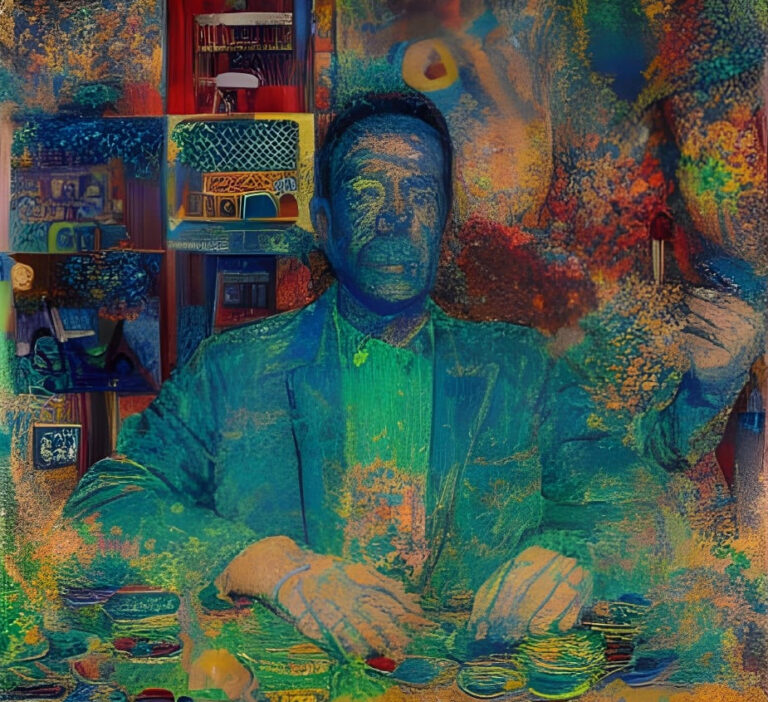
Forgive the delay while I dithered whether to choose "Network" or subject you to a dizzying double-feature of "Resolution" and "The Endless", two little-known indie flicks (which I've only learned just this second were consecutive films from the same director and writer—do I know how to pick them, or what?) about desperate people traveling to remote locations in southern California where the time/space continuum doesn't work as expected.
I have decided to go with "Network", figuring mentioning the other two and leaving you to your own devices would be sufficient.
"Network" is my favorite movie, full stop.
This 1976 movie by Sidney Lumet ("12 Angry Men", "Dog Day Afternoon", "Serpico"), a pitch-black tragicomedy about a media conglomerate capitalizing on the unraveling mental health of one of its news anchors, predicted so many real-life media trends before they happened that it's astounding.…
Once upon an Indieweb dreary, while I pondered, weak and weary,
Over many a quaint and curious volume of forgotten CSS,
While I coded, nearly hacking, suddenly there came SYN ACKing,
as if packets gently attacking, attacking at my firewall ports,
"'Tis some webmention", I muttered, "SYN ACKing at my firewall ports,
only this and nothing less."
Eagerly, I wished the morrow, for in vain, I hoped to borrow,
from #Cafe, surcease of sorrow—sorrow for the lost IPv4—
For the rare and radiant spec whom the angels name IPv4—
This is only a test, please ignore.
A note to the very small handful of people who read and occasionally even repost the website blog items and articles that I've been syndicating from my website, where I'm currently writing this, to a small clickable link on a Mastodon post or a somewhat more human-readable excerpt on Bluesky:
As of today I will no longer be syndicating my content to my current Mastodon and Bluesky accounts at @michaelkupietz.com@michaelkupietz.com on Mastodon and michaelkupietz.com.web.brid.gy on Bluesky. This will likely be the last post to those accounts.
The reason I have to retire those accounts is that they're controlled by the syndication service I was using, and I don't actually have full access to them myself. I'm turning off that service, so I can't use them at all.
But, as apparently a small handful of people do have an interest in occasionally seeing links to things I write delivered…
Slightly-better-than-it-should be tale of a mother and daughter breaking down on a lonely road and stalked by a monster. There's nothing here the experienced horror fan hasn't seen before—yet, for an assemblage of vaguely familiar horror tropes, it's a skillful assemblage, and the direction makes it stand out beyond what it might have been. Not a great movie by a long shot, but much better than it should be, but it's got a touch slower pacing and a few more character-driven elements than a b-grade horror movie usually does, both always a plus to me. And, pleasantly, it gets better as it goes along—the third act reflects back positively on the first two, as it goes for a slightly more quiet, thoughtful climax than the loud one many other movies of this sort would have gone for, even if it still never strays far from genre cliches.
And even…
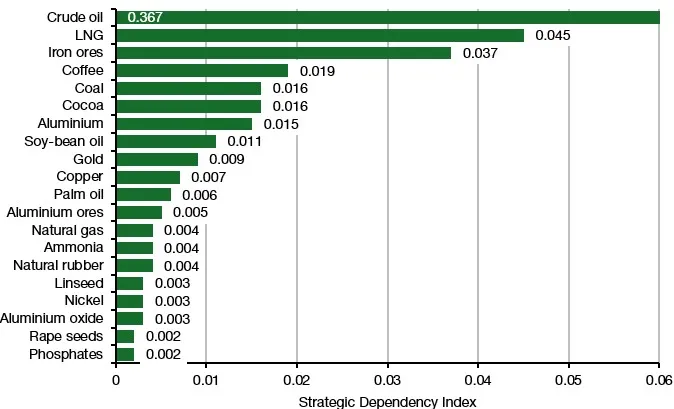
News that seems Indieweb-adjacent: according to a study reported on by investment strategist Joachim Klement, among commodity imports, only oil, LNG, and iron ore shortages have a higher impact on EU inflation than coffee shortages. https://klementoninvesting.substack.com/p/which-imports-really-matter-for-inflation
Source: Consonni and Magerman (2026) via Klement On Investing
No word on whether the effect is more pronounced in Scotland.
I've just posted an alpha of a small new WordPress plugin to my Github: KupieTools Usernote Shortcode.
Basically, I wanted to leave myself a note in a post, so I can see it on the front end when I view the post, but nobody else will. Now I can do this with [usernote]Note to myself here[/usernote]. It also allows specifying visibility by username or WordPress account role, like this: [usernote users="alice,bob" roles="administrator"]Note to Alice, Bob, and all administrators here[/usernote]
This is an alpha release, containing just the basic functionality I need this afternoon. In the future it will allow you to set defaults in a panel in the KupieTools admin settings page, like some of my other plugins. Right now you have to change them in the plugin code.
Somewhat derivative but reasonably watcable sci-fi thriller. In a world that is "The Walking Dead" with an ecological apocalypse instead of a zombie one, the remains of the government live in an artificial underground town somewhere between "Wayward Pines" and "The Truman Show", where everybody just loves crappy '80s Top 40 music.
The first season is a straight government/secret agent whodunnit thriller with a slight spritz of sci-fi, the second is a little more expansive, showing more of the world and the lead-up to the ecological disaster (refreshingly, a fairly well-done global tsunami and weather crisis caused by a volcanic eruption in Antarctica, not the result of human foolishness.) I enjoyed the second season a little bit more, although they're both decent at worst...
...except...
...for the '80s music. It's intrusive, and initially, very annoying, particularly that many episodes end with gratuitous, grating "slowcore", alt-folk, or dreary…
Coming from an alternative education background, I'm saddened to hear that Hampshire College is closing. I looked at attending Hampshire, and the friend of mine who I heard the news from went to the same orientation as I did and wound up going.
I didn't end up going there but always felt an affinity for the place. I believed in the model and in the need for small, funky schools, offering more self-directed education than traditional schools, for students like myself who didn't thrive in more conventional educational settings. (AKA "underachievers". I believe I'm the only person I know with a C average in high school, a teenage arrest on my record, and a degree in physics. Cowabunga, man.)
Obviously this is the result of bigger economic and societal currents that I have no wish to comment on. But it's a loss.

Once a month, someone in Indieweb hosts the "Indieweb carnival", a monthly theme which a bunch of bloggers all write about the same theme, and the links to posts are collected in a page together. This month's theme: Museum Memories (see the announcement post, and the roundup and recap of all submissions.)
Like many people, I have many fond memories of museums. Here are some recollections.
Sections:
Well, this is a new one. Today my gmail has started moving my emails out of the way to prioritize giving space to "AI Overviews" telling me what the email says. The summaries are longer than the actual email.
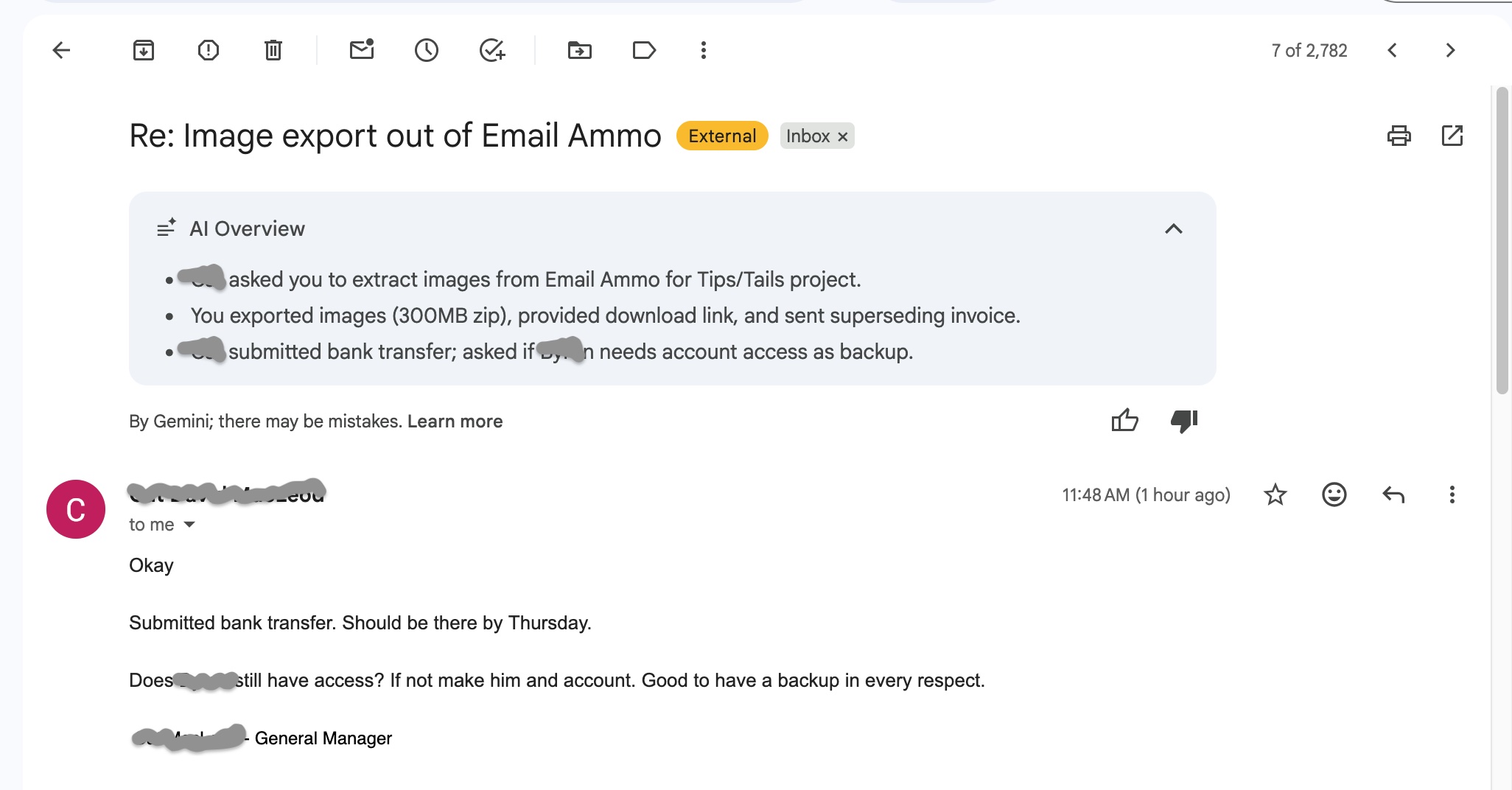
Imagine I started this three-sentence post with a "summary" that spent four sentences telling you what the post says. That's about how this strikes me.
This is a draft. Almost done. Check back in a few days.
I just read the piece "The Colonization of Confidence", a short story by Robert Kingett about the homogenizing effect of relying on technology for "cheap, fast, and easy" artistic expression, and it reminded me of a few things. What's interesting is that there is a strong parallel here to things that have happened before.
The most immediate thing that leapt to mind is the 13-page '80s Alan Moore comic book story "In Pictopia", which you can happily read in full at Forgotten Awesome, a response to that era's commercialization of comics, in which the residents of a seedy comic Metropolis full of superheroes and cartoon animals are one-by-one either removed or replaced by slicker versions of themselves, as an ominous, dark industrial mass closes in on the horizon.
The second is the work…
For those curious about how grisly the stock market has been lately, yesterday I got this news alert popup on a stock charting website I follow.
I hate to complain, but, I dunno, just very lately, I'm feeling something I haven't felt in a solid 4 decades: I'm bored. I'm telling you, that hasn't happened since I was 17, and now I'm 56 or 57 or something. I literally forgot all about boredom for 40 years. And now, I'm like, "Why is life like... what is it? Cardboard? Wait... it's boredom! Holy cow, I forgot about that!"
Seriously. This is weird. Like, I'm suddenly able to understand why people get married and get jobs and things like that. It must be to avoid feeling like this. Like, ok, what do I do, I've already played my lyre, my saxophone, and my guitar twice today, my website is up to date, I'm too hyper to read, what do I do now? Hey, maybe I should find a girlfriend and get married!" The whole picture suddenly makes…
It's a Marvel superhero movie.That generally says it all, in my experience.
Somehow these big Marvel superhero movies remind me of Michael Jackson's adult career: get a bunch of big-name luminaries together with a big budget to expertly craft something that screams "blockbuster", and yet still, somehow, manages to be less than the sum of its parts—the writing just isn't exceptional, it's formula dressed up with big names and glitzy production. . And everybody for some reason thinks it's great, except me.
Basically watchable, for a special-effects superhero action blockbuster. But for as much talent was involved in making this movie, that's a crime.
This post is my very first "blog only" post on this site.
This site was originally intended as a static showcase of my creative art, but for while now I've considered adding more social-media-like features to the site. So now, I've added a Blog Feed page under the Home menu, presenting the site in more of a blog format. This will include all articles from newest to oldest, much like the /Latest slashpage and newest articles readout at the bottom of the home page, but also may include what I've called "blog posts", brief or timely posts not deserving to be permanently included in this sites collection of articles. This Blog Feed page is the only place those blog posts will appear.
This will enable me to begin to include more social features on the site, probably eventually including webmentions, which will allow this site to…
Someone said this to me a while ago, I wish I could remember who, but it’s helped me deal with a lot of adverse circumstances.
A lot of us are going through hard times right now, and I’m sure a lot of people, like me, are feeling helpless. But there is one thing you can do for yourself pretty easily, even when you can’t seem to change your situation:
You’ve got to forgive yourself for your misadventures.
That one piece of advice has helped me a lot. Because even when you can’t change a negative circumstance, it’s all too easy to internalize it: blame yourself, think you somehow deserve it, Identify with it as if it’s a part of you.
This advice has often helped me reframe things so I don’t take them personally, making it easier to carry on. Something really bad happens? It’s not “me“. It’s…
2024nov25 — I was really struck by this tagline on Canva's new 2025 design report, saying "motion elements, dreamy textures, and AI innovation" would shape new design possibilities.
As an AI skeptic—which is to say, I'm extremely optimistic about the things AI has proven it does very well, and the things it's given strong indications it's moving towards really doing well, but deeply impatient with all the hype about speculative functionality outside of those—this really put a fine point to me on part of the problem. Not with AI, but with what people expect of it, what they spend money expecting it to do.
AI DOESN'T INNOVATE. AI is specifically engineered NOT to innovate. It specifically attempts to create something that matches what it previously ingested. If it deviates from that, innovates, we call that "hallucination", and it makes AI less useful, not more. This is because AI is…
Where technology is concerned: "Information needs expand to fill available bandwidth."
Where we used to have to fill in a one-page form, when automation arrived to make it quicker for us to fill in that form, very soon a ten-page form was required.
Reference: AI’s False Time-Saving Promise. Or Why AI Is Like The Vacuum CleanerBy Martin Gutmann, forbes.com, Nov 11, 2024. An article about how new "time-saving" technologies, such as vacuum cleaners, then computers, email, and now AI, increased workloads rather than reducing them.
Also tangentially related is Jevons Paradox, in which technology that increases efficiency creates an overall increase in resource consumption, rather than a decrease.
I've finally nailed what bothers me so much about those Upworthy headlines. It's that they they tell you what to think about about the video, instead of telling you what it's about.
The 90 days after the creation of a new area code in which either the old or the new code may be used to dial that area is called the permissive dialing period.
I have an idea about what happens after you die. I think when you go to heaven, St. Peter lets you in, they show you to a room. You take a sauna, somebody brings you a plate of cookies or a slice of cake. Then you take a nap.
Later on, when you're ready, they take you to a huge room, and everyone you've ever met is there. And everybody gets together and tells each other exactly what was going through their fucking heads. Then you all have a good laugh about it all. I see lots of back slapping and smiling eyes.
Wouldn't that be a great thing to look forward to?
Déjà vu: a false sense that something new has been seen before
Jamais vu: a feeling or impression that something familiar is unfamiliar or is being seen for the first time, like when you repeat a word so many times that it suddenly loses meaning and sounds alien
Presque vu: the illusory sense of having something on the tip of your tongue, or that a mental epiphany or breakthrough is about to occur
I wonder if the French have a word for the strange feeling that something wonderful has just happened, but you don't have any idea what?
For confused first-time visitors and other people still acclimating, here is a description of these little tabs to the left, as well as some other features of the site.
Open "Expert Mode" CLI Navigation - this give you the option to switch your browser's display to an old-fashioned terminal mode where you may browse this site, view pages and images by typing text commands. Just like how we used to browse the web back in 1978!
Open Visual Settings - This gives you controls to customize the visual display of this website to your liking: turn up or down the brightness, contrast, color temperature, hue, saturation, dark mode, and earthquake. Settings are saved per browser tab, so they will be remembered for your whole visit.
Open My Eyes - Have you ever been engrossed in your work, when you suddenly realize someone is staring at your screen, watching everything you do over your shoulder? If not, this simulates the experience.
Open Help - This help popup, silly! You just clicked it! Do you not remember?
New - Draggable elements! Several elements on this website, including these tabs, this popup message, and the "Hire Mike" badge in the lower right, can be dragged around with your mouse, to avoid them blocking content. Positions are remembered per tab, so as you navigate around the site, they will stay in the same place for your whole visit.
Enjoy!
Are you sure you want to switch to viewing this website in the "expert mode" command-line interface?
This will switch to a terminal emulator, load this page, and allow you to browse this website and view its contents by typing text commands.
Plus there might be, y'know, some fun stuff hidden in there. Just for geeks.