Creative Productions, Arrangements and Operations • Art, Technology and Amusements. Software Engineer and certified FileMaker Pro developer and full-stack web developer by day, https//www.kupietz.com
https://help.claris.com/en/pro-help/content/file-consistency.html - Information that FileMaker's consistency checks are not as reliable as the Recovery function—they don't check as much. (Bear in mind that the recovery doesn't even tell you everything on the front end, you have to read the recovery log to get full info.)
This is a work-in-progress inspired by a recent conversation.
In the "separation model" in FileMaker, where data tables live in separate files from an "interface file" containing visual layouts that display the data to the user, used to be widely recommended as a development convention. However, many developers have found that it has significant drawbacks. This is a scratchpad list of those drawbacks as I encounter them.
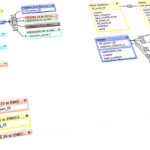
1. Duplicate relationship graphs
In practice, relationships depend on context, and this is provided by table occurrences that layouts are built on. You may need a portal on a layout... that means the relationship must be in the interface file. But you may have a calculated field in the parent record that counts, summarizes, or otherwise performs an aggregate operation on the related records. That means the relationship must be in the data file. Neither of these is unusual at all. So you…
https://help.claris.com/en/pro-help/content/file-consistency.html - Information that FileMaker's consistency checks are not as reliable as the Recovery function—they don't check as much. (Bear…
For confused first-time visitors and other people still acclimating, here is a description of these little tabs to the left, as well as some other features of the site.
Open "Expert Mode" CLI Navigation - this give you the option to switch your browser's display to an old-fashioned terminal mode where you may browse this site, view pages and images by typing text commands. Just like how we used to browse the web back in 1978!
Open Visual Settings - This gives you controls to customize the visual display of this website to your liking: turn up or down the brightness, contrast, color temperature, hue, saturation, dark mode, and earthquake. Settings are saved per browser tab, so they will be remembered for your whole visit.
Open My Eyes - Have you ever been engrossed in your work, when you suddenly realize someone is staring at your screen, watching everything you do over your shoulder? If not, this simulates the experience.
Open Help - This help popup, silly! You just clicked it! Do you not remember?
New - Draggable elements! Several elements on this website, including these tabs, this popup message, and the "Hire Mike" badge in the lower right, can be dragged around with your mouse, to avoid them blocking content. Positions are remembered per tab, so as you navigate around the site, they will stay in the same place for your whole visit.
Enjoy!
CLI Website Navigation
Are you sure you want to switch to viewing this website in the "expert mode" command-line interface?
This will switch to a terminal emulator, load this page, and allow you to browse this website and view its contents by typing text commands.
Plus there might be, y'know, some fun stuff hidden in there. Just for geeks.