Creative Productions, Arrangements and Operations • Art, Technology and Amusements. Software Engineer and certified FileMaker Pro developer and full-stack web developer by day, https//www.kupietz.com
Got it fixed today, the entire troubleshooting session is archived in the folder "2026oct12 fix cert nonrenewal after conversion to cloudflared" in my saved files on my hard drive.
While I was at it, I added my rss aggregator's instance to cloudflared's config, so that's working again.
Did you save the file with Windows's "Send too > Compressed Folder" and copy it to Mac? Finder's Archive Utility can't open it because of the compression method.
- Compression method: All 94 files inside use Deflate64 (Def64N in unzip -v). Windows' built-in "Send to → Compressed folder" uses it, mainly for large files. Archive Utility doesn't support it, so double-clicking fails with a generic error.
The command-line unzip at /usr/bin/unzip handles Deflate64. Run this in your terminal to extract into a new folder, of course replacing "[archive_name]" with the name of the zip file:
Claude says that following a kernel panic, watchdog reported threads held by Firefox GPU helper, even thought I have hardware acceleration off. I tried its suggestion of toggling gfx.webrender.software to true in about:config.
"The watchdog reports at 13:51:55 and 13:52:30 have 11 and 12 WindowServer waits on Firefox GPU Helper [47166]. The stackshot in the panic file at 13:53:15 shows the same PID, so the chain was blocked for about 80 seconds or more before the panic. - In those reports that GPU helper had been running about 266,000 s (roughly 3 days) and had a 2,294 MB footprint. - The panic was probably not a single event. The GPU helper was already stuck, WindowServer was already hanging, and the watchdogs fired before the kernel finally panicked at the 45 s framebuffer timeout."
Today I restarted my Mac OS Tahoe machine and suddenly, when I logged back in, a million old Slack notifications came up. Hovering over them, I did not get the "Close All" button on top, and had to tediously click them closed, one by one.
Turned out, in System Preferences under the Apple Menu, in the Notifications page, if I select "Slack", "Notification Grouping" was set to "None". Setting this to "Automatic" caused all the old notifications to collapse into a small visual "stack" behind the topmost notification, and when I hovered over it, the "Close All" button appeared.
Context: Investigating a WordPress site freeze on michaelkupietz.com. Root cause identified as a burst of 504 timeouts when a bot/crawler hit ~20+ uncached taxonomy archive pages (/genre/*, /topic/*) in rapid succession around 11:42.
Reloaded with systemctl reload php8.3-fpm. Purpose: Logs a full PHP stack trace any time a request takes 5+ seconds, to help diagnose future slowdowns. Negligible performance/disk impact — only…
https://help.claris.com/en/pro-help/content/file-consistency.html - Information that FileMaker's consistency checks are not as reliable as the Recovery function—they don't check as much. (Bear in mind that the recovery doesn't even tell you everything on the front end, you have to read the recovery log to get full info.)
Turns out LLMs know me by an old subdomain I forgot to add to cloudflare's tunnel config. Just added it. See saved chat under filename "Arts Kupietz 404 Issue" in local admin folder.
First, cd into the same folder as the file (here called input.md. Then the above will generate titled .md documents from every section that starts with ##.
This is a work-in-progress inspired by a recent conversation.
In the "separation model" in FileMaker, where data tables live in separate files from an "interface file" containing visual layouts that display the data to the user, used to be widely recommended as a development convention. However, many developers have found that it has significant drawbacks. This is a scratchpad list of those drawbacks as I encounter them.
1. Duplicate relationship graphs
In practice, relationships depend on context, and this is provided by table occurrences that layouts are built on. You may need a portal on a layout... that means the relationship must be in the interface file. But you may have a calculated field in the parent record that counts, summarizes, or otherwise performs an aggregate operation on the related records. That means the relationship must be in the data file. Neither of these is unusual at all. So you…
Today Comcast (boo! hiss!) did some work in my neighborhood and knocked my server offline. I had a long, painful chat session with ChatGPT which ended with me eventually getting set up with cloudflare tunnels instead of using ddclient to update my IP address. The whole chat and terminal session are saved locally in my hard drive in the backups/admin > troubleshooting logs folder in case I ever need to recreate what happened.
On my iPhone, I had Siri dication suddenly start inserting bogus commas everywhere when I never said "comma". You can turn this off by going to settings > general > keyboard > dictation and turning off the auto-punctuation switch.
If your phone and Mac appear to be able to see each other over Airdrop, but every time you try to send photos from your phone to your Mac the phone sits on "waiting" and the photos never transfer, try picking "Force quit..." from the Apple icon menu in the upper left of your window on the Mac, select "Finder", hit the "Relaunch" button, wait a moment for the Finder to restart, and try transferring again.
Here's a CSS customization feature. Have fun getting it to work!
Have to leave the app to customize CSS. Why can't you save snippets in the app?? Overall, it feels like they intentionally make it as difficult and roundabout as possible to use.
And of course I followed the instructions, created the snippet in the secondary text editor Obsidian makes you keep around if you want to do things like this, quit the app, reopened it, and... it didn't work. Because, of course it didn't work. Why would following the instructions WORK, when it's so much more of a waste of time if it doesn't? I'm so glad they made this so complicated. This is so much harder than if they just had a place in the preferences to enter custom CSS, and, who doesn't love things to be as hard as possible?
If you're like me, you loathe and despise the toxic mental ordure that YouTube often plasters up and down the right side of each video page, such as POLITICAL DEMAGOGUERY in MIXED CAPS to PIQUE your OUTRAGE enough to KEEP YOU WATCHING YOUTUBE instead of doing something PRODUCTIVE! [insert thumbnail of someone looking amazed here.]
At a certain point, I started to notice that there was more likely to be things I didn't even want to know existed in that section than anything I actually wanted to see. So, I added a simple rule to the uBlock Origin browser plugin that hides that section of the page:
If the web server is slow, detect a SYN flood by netstat -ant | grep :443 | grep SYN_RECV to show the IP addresses leaving it hanging. Hint: If you're behind a reverse proxy, and that shows IP addresses that aren't the proxy's, then your IP is being hit directly. To find out how many IPs are hanging, do netstat -ant | grep :443 | grep SYN_RECV | wc -l. If you do it a few times and the number is increasing, you may be under attack. If it's over 100, that's suspicious, but manageable and the server can usually handle it, especially if you have SYN cookies activated. If it's over 1000, you're under attack.
Firefox as of v 148 (actually a bit earlier than that, but that's what I'm on right now) frequently decides not to load pages anymore. You enter a URL or click on a link and get the status message "Waiting for [URL]..." and you can wait as long as you care to.
When this begins, your only choice is to restart Firefox.
Here is a list of "solutions" to the problem from around the web, which I have tried and found do not fix the problem: • Turning off DNS-over-HTTPS in Firefox Settings • Flushing MacOS's DNS cache. • Going to about:networking and clearing Firefox's DNS cache • Going into about:config and changing network.dns.disableIPv6 from false to true • Opening in "troubleshooting mode" or disabling all extensions • Turning VPN off • Turning VPN on
Long story short, I got a message from a user that audio playlists were working in Firefox but not Chrome. The Chrome console had an error that "jQuery" wasn't defined, but typing jQuery into console did show a function definition. Turns out, in Lightspeed Cache's JS Delayed Includes, I had entered the word jquery by itself on a line, with a note to myself that something was causing a browser flash if I didn't do that. But removing this made the playlist shortcodes work on Chrome again. Ergo: don't defer jQuery.
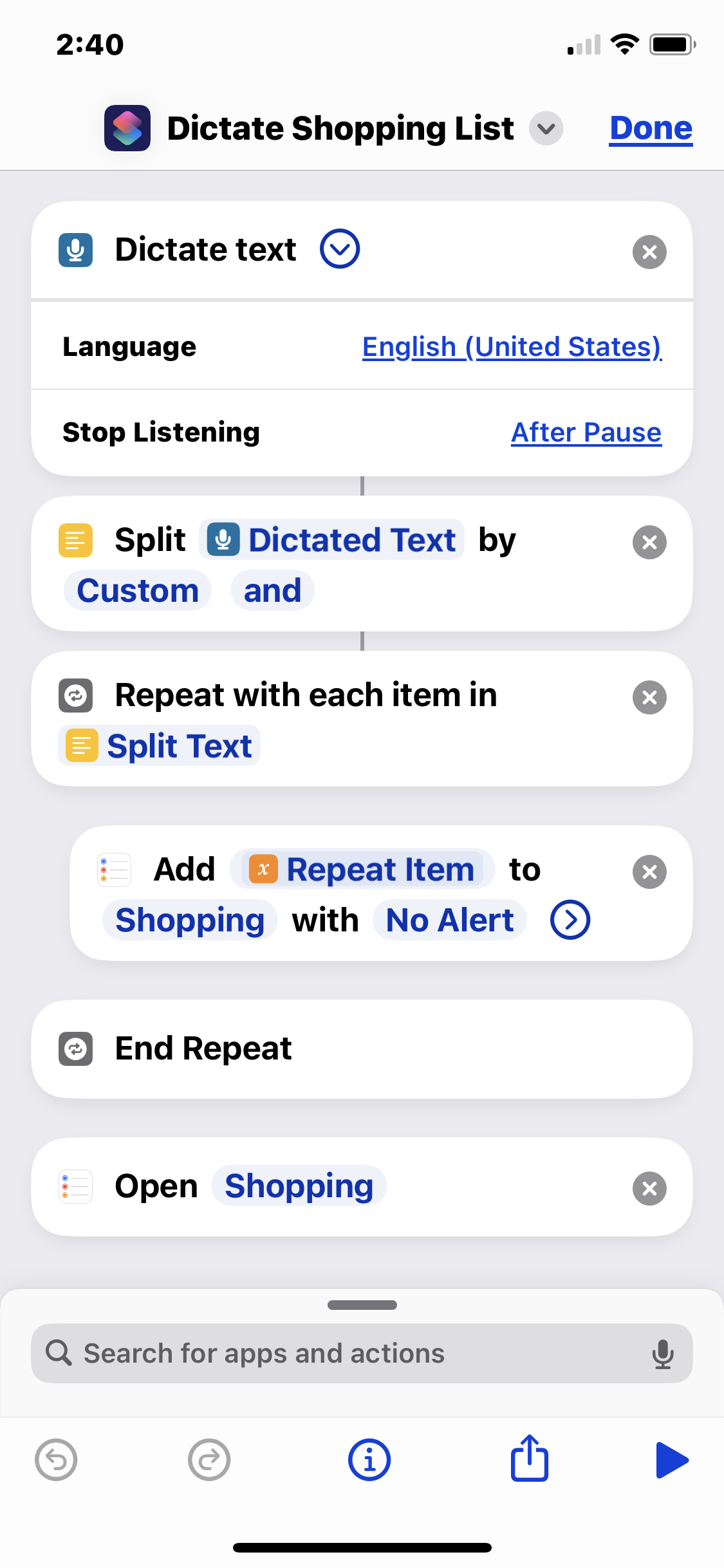
I uses this shortcut to dictate my shopping list into the iOS Reminders "Shopping" list. It breaks spoken lists on the word "and" to create separate shopping list items.
So I might run the shortcut, say the phrase "pickles and hot dogs and mustard", and it will add "pickles", "hot dogs", and "mustard" as separate checkbox items to the Shopping list in Reminders. It's handy for rattling off my shopping list as I'm staring into my fridge.
Obviously you need a list called "Shopping" set up in your Reminders app.
This shortcut executes the following steps:
Dictate text - listens for spoken input. Make sure set to '''stop listening after pause'''.
Split Dictated Text by Customand - splits the text into a list with "and" as the delimiter
Repeat with each item in Split Text - begins the loop that adds…
SSHing into a local MacOS machine at address "macbook.local", I suddenly got this:
[code]@@@@@@@@@@@@@@@@@@@@@@@@@@@@@@@@@@@@@@@@@@@@@@@@@@@@@@@@@@@ @ WARNING: REMOTE HOST IDENTIFICATION HAS CHANGED! @ @@@@@@@@@@@@@@@@@@@@@@@@@@@@@@@@@@@@@@@@@@@@@@@@@@@@@@@@@@@ IT IS POSSIBLE THAT SOMEONE IS DOING SOMETHING NASTY! Someone could be eavesdropping on you right now (man-in-the-middle attack)! It is also possible that a host key has just been changed. The fingerprint for the ED25519 key sent by the remote host is SHA256:oKCEu3pDdq7xBhSPZwOzR2q0eWTvfphtvn3D4Bjz8v4. Please contact your system administrator. Add correct host key in /Users/username/.ssh/known_hosts to get rid of this message. Offending ECDSA key in /Users/username/.ssh/known_hosts:147 Host key for macbook.local has changed and you have requested strict checking. Host key verification failed.[/code]
The solution was to run ssh-keygen -R macbook.local then try the ssh again. Then it asked me whether or not to accept the key, instead of rejecting it:
[code]$ ssh username@macbook.local The authenticity of host 'macbook.local (fe80::1890:fd32:c304:69cd%en0)' can't be established. ED25519 key fingerprint is SHA256:oKCEu3pDdq7xBhSPZwOzR2q0eWTvfphtvn3D4Bjz8v4.…
If CSS animations cause a layout shift even if they're on compositable ettributes, look for clip paths, overflow:hidden, or css filters on them or their ancestors.
So, I had a crazy problem. You'll notice that there's various draggable elements on this site... such as the "Kupietools" plugin tabs seen at left, the occasional "the site is being worked on right now" notices that pop up, etc. You can drag them around with your mouse.
This is done with a plugin (also available as a standalone javascript module, a few versions behind the plugin as I write this) that retrofits code onto various HTML elements by giving the plugin the classnames it needs to make interactive.
I was doing some optimization on the site loading to speed things up, such as getting WordPress to load a lot of CSS file late so as not to interfere with initial page load stats. (This is a whole art, beyond the scope of this article.) Suddenly…
For confused first-time visitors and other people still acclimating, here is a description of these little tabs to the left, as well as some other features of the site.
Open "Expert Mode" CLI Navigation - this give you the option to switch your browser's display to an old-fashioned terminal mode where you may browse this site, view pages and images by typing text commands. Just like how we used to browse the web back in 1978!
Open Visual Settings - This gives you controls to customize the visual display of this website to your liking: turn up or down the brightness, contrast, color temperature, hue, saturation, dark mode, and earthquake. Settings are saved per browser tab, so they will be remembered for your whole visit.
Open My Eyes - Have you ever been engrossed in your work, when you suddenly realize someone is staring at your screen, watching everything you do over your shoulder? If not, this simulates the experience.
Open Help - This help popup, silly! You just clicked it! Do you not remember?
New - Draggable elements! Several elements on this website, including these tabs, this popup message, and the "Hire Mike" badge in the lower right, can be dragged around with your mouse, to avoid them blocking content. Positions are remembered per tab, so as you navigate around the site, they will stay in the same place for your whole visit.
Enjoy!
CLI Website Navigation
Are you sure you want to switch to viewing this website in the "expert mode" command-line interface?
This will switch to a terminal emulator, load this page, and allow you to browse this website and view its contents by typing text commands.
Plus there might be, y'know, some fun stuff hidden in there. Just for geeks.



































































 So, I had a crazy problem. You'll notice that there's various draggable elements on this site... such as the "Kupietools" plugin tabs seen at left, the occasional "the site is being worked on right now" notices that pop up, etc. You can drag them around with your mouse.