
I uses this shortcut to dictate my shopping list into the iOS Reminders "Shopping" list. It breaks spoken lists on the word "and" to create separate shopping list items.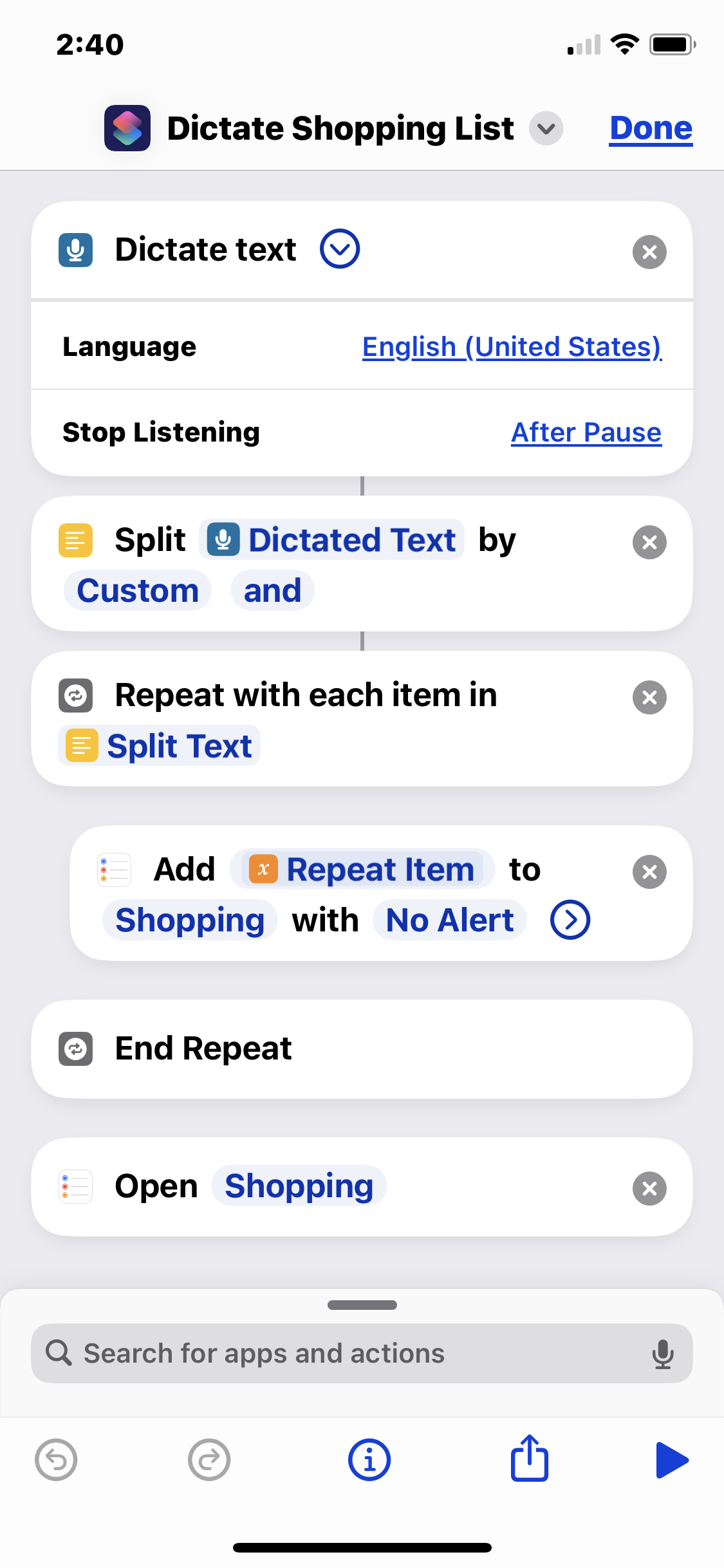
So I might run the shortcut, say the phrase "pickles and hot dogs and mustard", and it will add "pickles", "hot dogs", and "mustard" as separate checkbox items to the Shopping list in Reminders. It's handy for rattling off my shopping list as I'm staring into my fridge.
Obviously you need a list called "Shopping" set up in your Reminders app.
This shortcut executes the following steps:
- Dictate text - listens for spoken input. Make sure set to '''stop listening after pause'''.
- Split
Dictated TextbyCustomand- splits the text into a list with "and" as the delimiter - Repeat with each item in
Split Text- begins the loop that adds the items - Add
Repeat ItemtoShoppingwithNo Alert- adds each item as a separate checkbox line to the "Shopping" list in Reminders.app - End Repeat - ends the repeat loop
- Open
Shopping- opens the shopping list. Scroll to the bottom to see the newly-added items.
You can download the shortcut from iCloud at https://www.icloud.com/shortcuts/fdd72ecbc3794a6f8f9a618c87a0b21b. I created this iCloud link from his working copy; hoever, you assume all risk from importing or running code from iCloud — so I recommend you recreate it from the steps above or screenshot at right instead.

