Latest "Apps" files
Workshop » Reference Section » Grimoires » IT » Platforms » MacOS » Apps

Things That Don’t Get Firefox To Start Loading Pages Again When It Decides It Doesn’t Want To

Firefox as of v 148 (actually a bit earlier than that, but that's what I'm on right now) frequently decides not to load pages anymore. You enter a URL or click on a link and get the status message "Waiting for [URL]..." and you can wait as long as you care to.

When this begins, your only choice is to restart Firefox.

Here is a list of "solutions" to the problem from around the web, which I have tried and found do not fix the problem:
• Turning off DNS-over-HTTPS in Firefox Settings
• Flushing MacOS's DNS cache.
• Going to about:networking and clearing Firefox's DNS cache
• Going into about:config and changing network.dns.disableIPv6 from false to true
• Opening in "troubleshooting mode" or disabling all extensions
• Turning VPN off
• Turning VPN on
Workshop » Reference Section » Grimoires » IT » Platforms » MacOS » Apps

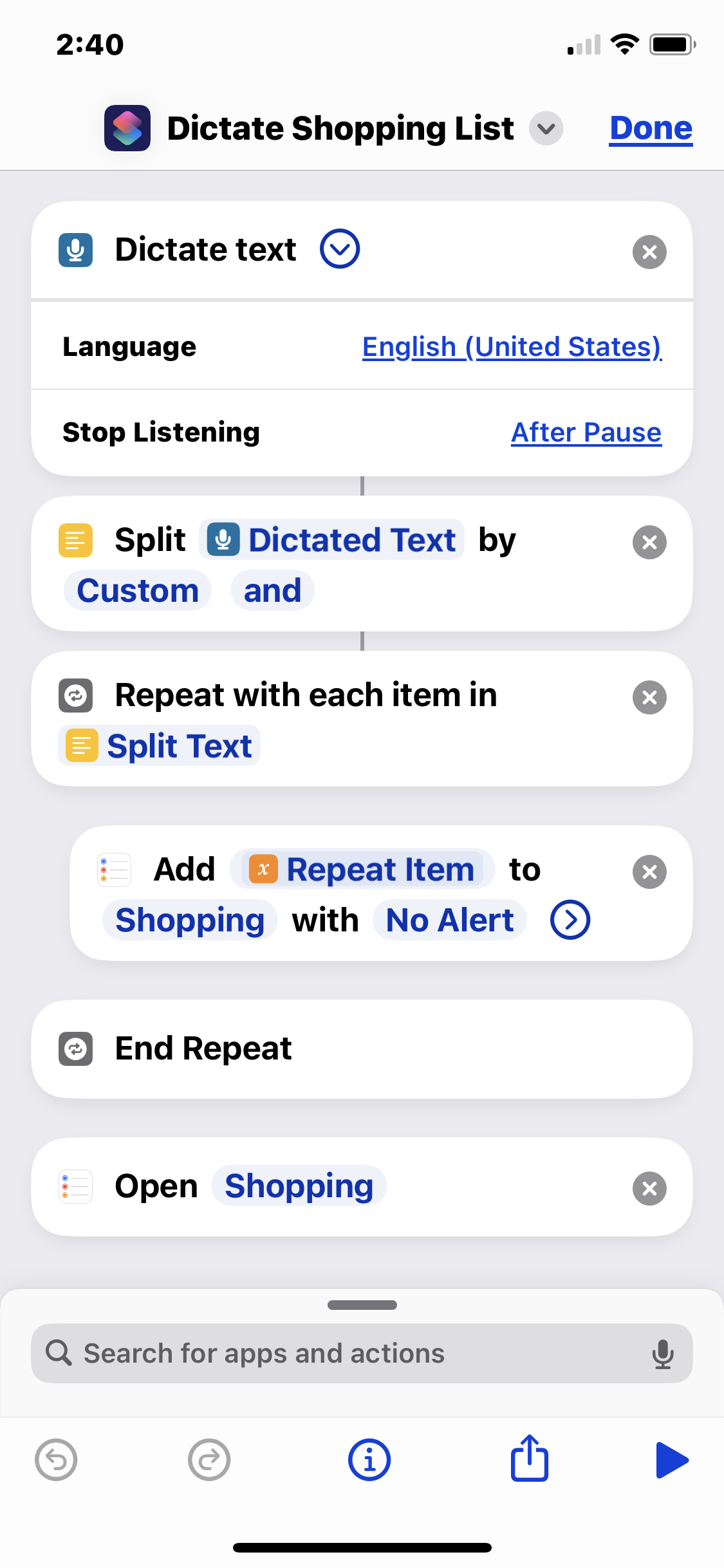
iOS Shortcut to dictate your shopping list into Reminders.app

I uses this shortcut to dictate my shopping list into the iOS Reminders "Shopping" list. It breaks spoken lists on the word "and" to create separate shopping list items.

So I might run the shortcut, say the phrase "pickles and hot dogs and mustard", and it will add "pickles", "hot dogs", and "mustard" as separate checkbox items to the Shopping list in Reminders. It's handy for rattling off my shopping list as I'm staring into my fridge.

Obviously you need a list called "Shopping" set up in your Reminders app.

This shortcut executes the following steps:

  1. Dictate text - listens for spoken input. Make sure set to '''stop listening after pause'''.
  2. Split Dictated Text by Custom and - splits the text into a list with "and" as the delimiter
  3. Repeat with each item in Split Text - begins the loop that adds…
Workshop » Reference Section » Grimoires » IT » Platforms » MacOS » Apps

Xbar/BitBar gives “Couldn’t Posix Spawn” for script.

Apple's quarantine system can cause this. Try

[code]chmod +x com.apple.quarantine /path/to/script.sh xattr -d com.apple.quarantine /path/to/script.sh[/code]

In my experience only the xattr is needed but the chmod might help and couldn't hurt.

Workshop » Reference Section » Grimoires » IT » Platforms » MacOS » Apps

How to fix if the “Save” button is grayed out in Photoshop CC 2017 save and export dialogs

I don't know if this affects other versions of Photoshop, but on MacOS Photoshop CC 2017 frequently starts unexpectedly graying out all save buttons when you have made changes to your file and should be able to save.

The secret is to resize and move around the dialog. Drag the lower right corner to make it bigger and smaller a few times, and try dragging the whole dialog to the upper left corner of the screen and making it small.

This fixes it for me.
