private » Programming Hacks Used In This Site
Algorithms & Old Lace: LLM Poisoning For Personal Websites

Rage Against The Machine: Algorithms & Old Lace: LLM Poisoning For Personal Websites

Private AIs: They're Watching You

Last year my friends in an Indieweb meetup began to notice that information about them was turning up in LLMs... some comically inaccurate, some uncannily personal. As a group of personal website developers, we knew that much of the information must've been scraped of our website.

It might not be apparent reading my site, but I've always been a little careful about what information I allow about myself on the web. It's near impossible to prevent personal information from leaking out, and my name is unique enough that I'm not hard to find. I had an unfortunate incident with an online stalker a number years ago and since then have always been careful. I also once had a real-life harasser who broke into my home, although that was a much different and more complex situation. But together these made me aware that…

Workshop » Reference Section » Grimoires » IT » Applications » Web Browsers » CSS
Web Developer Reference: Comprehensive List of CSS Units

Web Developer Reference: Comprehensive List of CSS Units

Here’s a guide to all currently available CSS units, with explanations and common use notes. This includes all CSS units listed in MDN Web Docs as of 2025aug15.

Sections:

By Category Angle units
  • deg: Angle Degrees (360deg = full circle).
  • grad: Angle Gradians (400grad = full circle).
  • rad: Angle Radians (2πrad = full circle).
  • turn: Angle Turns (1turn = full circle).
    Used in transforms, gradients, and trigonometric functions.
          Frequency units
          • Hz: Hertz. Cycles per second (e.g., for aural/speech media).
          • kHz: Kilohertz (1000Hz). Rarely used in typical web CSS.
            Length Units: Absolute length units (fixed physical or device-referenced)
            • px: CSS pixel. The most common unit for on-screen layout. Scales with zoom; not a physical device pixel.
            • in: Inch (1in = 96px).
            • cm: Centimeter (1cm =…
            Code & Algorithms » Web
            A Technological Solution to Disincentivize a Web Development “Concern Troll”

            Fun With A Purpose: A Technological Solution to Disincentivize a Web Development “Concern Troll”

            I had an interesting thing happen a few months ago where a troll in a chat room decided for some reason to run my site through the W3C's Nu HTML Validator and apparently was grievously wounded by the validation errors it had—and furthermore, had a big concern with the overall bandwidth consumption of the site, with all its images and heavy pages.

            Rather than simply solving the problem by not visiting my site, this person apparently felt some sort of imperative to berate me over these things and not. let. it. drop, making the chat room difficult to be in and necessitating action on my part.

            So, rather than try to verbally wrangle with a troll, I whipped up a technological solution. And, of course, the monkey in my soul decided to have a little fun with it.

            I. Lassoing the HTML Validator

            Nowadays, if…

            Code & Algorithms » Demo & Live Tool Playground
            Web Demo: CSS Dynamic Point Light Source & Parallax Shadows

            Let There Be More Light: Web Demo: CSS Dynamic Point Light Source & Parallax Shadows

            Click here to view this in a separate tab.

            This demonstrates a high-performance method of rendering dynamic CSS drop shadows from a simulated point light source.

            The note and sun light source elements have been made interactively user-draggable by the inclusion of an external draggability package.

            Until I have this documented, you can see the code on Codepen at https://codepen.io/kupietz/pen/LEpzJgL.

            Update, Feb 2026:

            This is not my work but it deserves a mention here. I've been completely outdone. Check this demo out. This guy designed an entire css system around physical lighting: https://ambientcss.vercel.app/ Github: https://github.com/kikkupico/ambientcss

            Workshop » Works In Progress » Code & Algo Works In Progress
            Draggable Elements WordPress Plugin

            Nothin' But A Drag: Draggable Elements WordPress Plugin

            First, the demo

            This is a brief demo page for my KupieTools Draggable Elements WordPress plugin, which dynamically adds interactive draggability to any page element, based on CSS class names (or, really, any CSS selector).

            Here's some boxes:

            Drag Me Horizontally Drag Me Vertically Drag Me Anywhere Drag Me To Corners

            If you select "View Page Source" on this page in your browser, you will see that the above four DIV elements, as defined in the page HTML, are just ordinary DIV elements with a single classname, an ID, and some visual styling. The KupieTools Draggable Elements plugin adds draggability to any arbitrary page element, by simply specifying a class name or other CSS selector for it in the plugin. (If you use your browser's Inspector instead of View Page Source, you'll see the current state of those elements, with any changes or additions the plugin created…

            home » Social Web / Community Features
            88×31 Website Buttons

            Lord, They're Everywhere: 88×31 Website Buttons

            .entry-content img {border-radius:0 !important;}

            In the spirit of keeping up with the Joneses I've finally created an 88x31 button for those wishing to link to this site. I characteristically have two nearly-identical versions which nobody but me will probably notice the difference between, I'm not sure which I like best yet. I may make more.


            "Built During An Indieweb Meetup" buttons

            I strongly suggest, if you use these buttons, that you use an [code][/code] tag to link them to https://events.indieweb.org.

            Download PSD template: built-during-indieweb-button.psd

            "Holla Atcha Boy" button

            Inspired by something said during an IndieWeb meetup*, this button is, um, a "Holla Atcha Boy" button... built during an IndieWeb meetup, earning this page one of its own buttons.

            *They said, "Holla atcha boy".

            "Try CLI Mode" buttons

            These are for linking to this website's "expert mode"

            Workshop » Works In Progress » Code & Algo Works In Progress

            Customization Is King: KupieTools Custom WordPress Plugins Overview

            Pardon My Placeholder!

            This page is a placeholder listing my various Github repos containing my custom WordPress plugin work, loosely branded as "KupieTools", as I work on more detailed pages documenting them.

            kupietools/ktwp-wp-plugin-caching-toolkit A plugin providing functions for WordPress developers to implement PHP function caching for performance. kupietools/ktwp-wp-plugin-cli-mode WordPress plugin supplementing my CLI.html text-based web browsing front end. Adds a little icon on wordpress pages to allow users to switch to a javascript-based terminal emulator providing web page browsing commands via the keyboard. kupietools/ktwp-wp-plugin-debuggery-toolkit WordPress plugin providing handy debugging functions particular to the author's needs. /kupietools/ktwp-wp-plugin-draggable-elements WordPress Plugins allowing developers to make any previously existing page element draggable freely, vertically, horzontally, or constrained to corners, by adding the element's CSS selector to the plugin code. kupietools/ktwp-wp-plugin-editor-codefolding WordPress plugin adding code folding (disclosure triangles) to the built-in editors on WP's admin…
            Code & Algorithms » Demo & Live Tool Playground
            Pure CSS interactive web holiday lights (updated for 2025)

            season's geekings: Pure CSS interactive web holiday lights (updated for 2025)

            /* xmas lights */ #lightrope { text-align: center; white-space: nowrap; overflow: hidden; position: fixed; z-index: 1000; margin: -15px 0 0 0; padding: 0; pointer-events: none; width: 100%;left: 0;top: var(--wp-admin--admin-bar--height); } #lightrope > li { position: relative; display: inline-block; list-style: none; margin: 20px 20px 20px 22px; } #lightrope > li > div { position: relative; border-left: 2px solid rgba(0,0,0,.05); border-right: 2px solid rgba(255,255,255,.5); margin: 2px 0 0 -3px; padding: 0; display: block; width: 8px; height: 18px; border-radius: 50%; transform-origin: top center; -webkit-animation-fill-mode: forwards; animation-fill-mode: forwards; pointer-events: auto; } /* Colors for different bulbs */ #lightrope > li:nth-child(5n+0) > div { -webkit-animation-duration: 0.8s, 4.1s, 3s; animation-duration: 0.8s, 4.1s, 3s; } #lightrope > li:nth-child(5n+1) > div { -webkit-animation-duration: .9s, 4.3s, 3s; animation-duration: .9s, 4.3s, 3s; } #lightrope > li:nth-child(5n+2) > div { -webkit-animation-duration: 1s, 4.5s, 3s; animation-duration: 1s, 4.5s, 3s; } #lightrope > li:nth-child(5n+3) > div { -webkit-animation-duration: 1.1s, 4.7s, 3s; animation-duration: 1.1s,…
            Code & Algorithms » Web
            Web Design—Adding Text Previews To HTML Details Disclosure Elements

            god is in the details: Web Design—Adding Text Previews To HTML Details Disclosure Elements

            Looking around the site, you might get the hint that I'm a big fan of <details class="detailsClassName"><summary>blah blah blah</summary> even more blah blah blah</details> disclosure elements.

            For those unfamiliar, that's this:

            Here's a title of a section

            Here's where a bunch of information goes. Blah Blah Blah Blah Blah Blah Blah Blah Blah Blah Blah Blah Blah Blah Blah Blah Blah Blah Blah Blah Blah Blah Blah Blah Blah Blah Blah Blah Blah Blah Blah Blah Blah Blah Blah Blah Blah Blah Blah Blah Blah Blah Blah Blah Blah Blah Blah

            It's true. I am.

            But, I have one issue with them: sometimes I feel like they're a little nonintuitive. It's easy to miss them in certain circumstances, or maybe even not to realize they're clickable.

            So, I came up with a way to make them show a preview of the contents.
            First, you need the following…

            Code & Algorithms » Web
            Scripts to Analyze CSS from Firefox’s Javascript console.

            For Web Devs and Other Tool-Using Animals: Scripts to Analyze CSS from Firefox’s Javascript console.

            When, in the course of human events, it becomes necessary to understand why your wordpress site's freaking menus display fine when you're logged in as administrator but are completely broken when you're logged out, it may be useful to be able to easily compile all the CSS for the affected page elements for both the working and nonworking versions, and compare them to see what might be different.

            Let me back up. I had a problem the other day where my Wordpress site's caching plugin, which performs various optimizations on my site's code for non-logged-in users, was adding some sort of broken CSS. When I was logged in, everything worked fine, but when not logged in, something changed somewhere in the CSS that caused some of my menus not to display. I had a rough idea of where the changed code must be, but no more than that, and…

            Code & Algorithms » Web
            Resurrecting the HTML <BLINK> tag

            In With The Old: Resurrecting the HTML <BLINK> tag

            Back in the bad old days, there was an HTML tag called [code][/code]. It did this, which everybody hated because it was annoying, and everybody's web pages looked like this:

            .blink { display: inline-block; animation: blink 1s step-end infinite;} .oldschool, .oldschool * {font-family:times,'times new roman',serif !important;} .oldschool:not(a), .oldschool *:not(a) {color:#000;} .oldschool a, .oldschool a blink {color:blue !important;text-decoration:underline !important;} .oldschool a:visited blink {color:purple !important;}

            Hello! Welcome to Kupietz Arts+Code This is the homepage of Mike Kupietz where you can see all his art, music, writing, and code!

            BEST VIEWED WITH

            An interesting bit of history, courtesy of Lou Montulli, early Mozilla engineer and author of…

            private » Programming Hacks Used In This Site
            Non-render-blocking YouTube embeds in WordPress

            Video Killed The Pagespeed Score: Non-render-blocking YouTube embeds in WordPress

            On this site's Music Reviews page (itself built on-the-fly by a shortcode that sorts and displays posts from a "Music Review" custom post type), most of the reviews are accompanied by YouTube video embeds from the album in question.

            What I didn't realize in setting that up is that YouTube embeds use [code][/code] tags to embed videos, and [code][/code] tags block page rendering—the page's onload property, which signals that the page is fully ready to display to the viewer and to remove the spinning "page loader" image I use on this site as pages load—does not fire until every iframe on the page has fully loaded its contents. This caused that page, which currently only has a handful of videos on it, to load very slowly. What's worse, this site's custom menus parse all page contents every time the site is updated to display for word counts,…

            private » Programming Hacks Used In This Site
            WordPress Shortcode & Function Performance Optimization with Transients

            Optimization-A-Go-Go: WordPress Shortcode & Function Performance Optimization with Transients

            I suffer from that paradoxical form of laziness peculiar to computer geeks where I will save myself save myself 15 minutes of work on something by spending 4 hours creating a shortcut. As such, the menus on this site are dynamically generated by traversing the category tree in PHP and laying out menus and submenus from categories and subcategories, sparing me the trouble of updating them manually as I add new content. This took some effort.

            I created a shortcode that does this (well, modified a shortcode, originally from the Hierarchical HTML Sitemap plugin, by Alexandra Vovk & WP Puzzle) and soon my site was happily generating dynamic menus on the fly and keeping up with my work as I added pages, edited titles, and rearranged categories.

            And, along the way, getting slower.

            And slower. And slower.

            Finally the other night, due to a confluence of circumstance,…

            Code & Algorithms » Web
            How to make a completely unusable homepage in CSS3 and <strike>jQuery</strike>Javascript

            Usability Hell: How to make a completely unusable homepage in CSS3 and jQueryJavascript

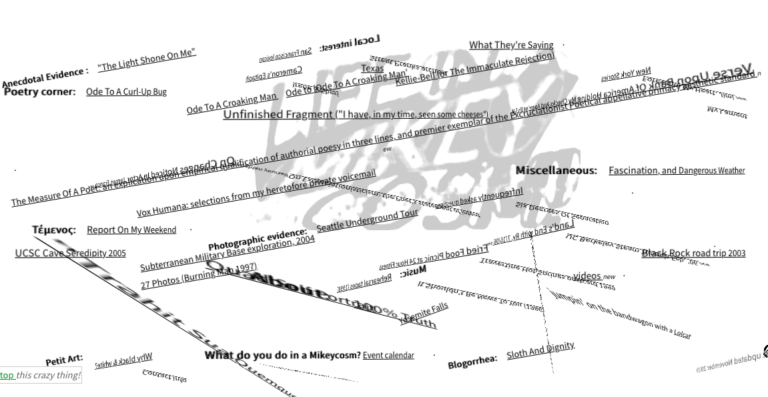
            One of my favorite bits of code I've ever written is on the front page of my jiggy, ancient, perpetually-under-construction, virtually-never-viewed old personal website, Life In A Mikeycosm. Eager to make my front page "pop" a little more back in days gone by, I came up with a clever CSS3/javascript hack that caused the page text and logo to slip and slide in three dimensions in response to your mouse movements, rendering the page somewhere between difficult and totally unusable for actually navigating the content of the site. I've always been inordinately fond of this.

            I've embedded it below so you can experience the source of my amusement. Actually, if you click through the above link to the real site, at the bottom left there's a "Stop this crazy thing" link that stops the animation and moves the links into rows so they're readable and clickable. I…

            Code & Algorithms » Web

            Take The Edge Off Your Web Browsing: WebCooler userscript

            If you're like me, you care passionately about certain subjects; the natural flip side of this is being viscerally revulsed by certain things. As a matter of mental hygiene I'm fairly picky as to who and what I let into my world, but unfortunately, on the world wide web, it can be tough to avoid being forced to give some of your mindshare to things that are just plain not productive to pay attention to.

            With this in mind, I created a browser userscript I call the "WebCooler". WebCooler sits in your browser, hosted by a free userscript manager plugin like GreaseMonkey or TamperMonkey. You supply it with lists of words and topics you don't care to see, and it cleanly and invisibly removes those matching terms from the web, not by erasing just those words, but by silently and invisibly…